
Coffee or Tmux
Published onAccording to Wikipedia - tmux is a terminal multiplexer for Unix-like operating systems. But to me; tmux is a complex tool to have on the terminal. Using tmux gives your terminal super-powers (if you may), from being able to split your terminal window into multiple panes to creating tabs (also known as windows on tmux).

I have been using tmux for a while now and here’s a few things i’ve learnt so far that might be useful to a beginner
- Changing the default prefix key
- Panes
- How to copy and paste on tmux
Changing the default prefix key
Tmux uses a prefix key for global commands, the default key is CTRL + b or Cmd + b which I find to be a hard combination to reach, so it’s probably the first thing you’d want to change after installing tmux on your computer.
This can be done in the tmux configuration file .tmux.conf on the Home directory of your user account. Edit this file and add/replace the line similar to below:
unbind C-b
set -g prefix C-a
This will set the prefix to CTRL + a key. Now you could split the window vertically by pressing CTRL + a and " and will have two panes.
Panes
By default a window starts with one pane. The window can then be split into multiple panes that appear on the screen. This is common to the “window splitting” feature on popular terminal emulators like terminator or hyper
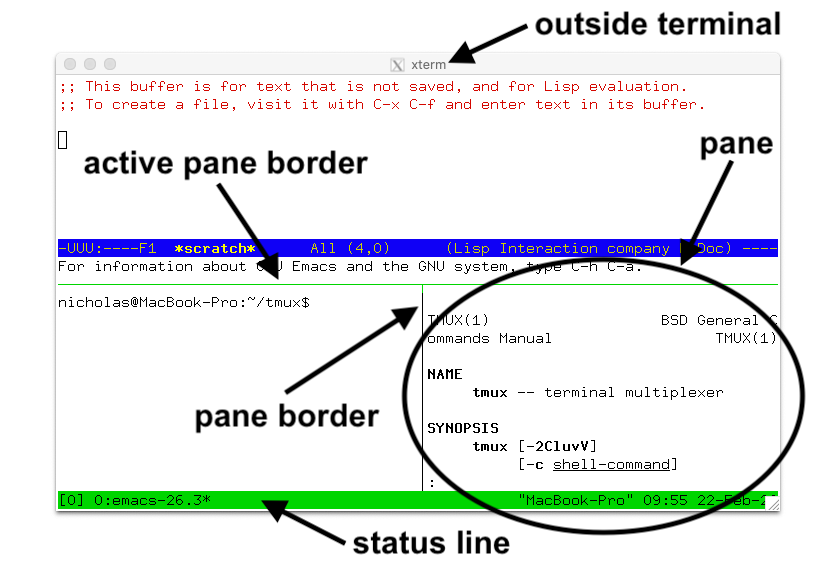
Here are a few commands I use a lot with panes
- Moving between panes
[PREFIX]+[DIRECTION] // so for Up = CTRL+A then Up - Zooming in and out
[PREFIX]+Z // or in our case CTRL+A then Z - Splitting
[PREFIX]+% // for a horizontal split
[PREFIX]+" // for a vertical split
Copy and paste
This is especially useful if you need to copy output from one pane to another or within the same pane.
Sophia Brandt wrote a nice article on how that works and more but in a nutshell, here’s the steps:
- Enter copy mode by pressing
CTRL+b,[. - Use the arrow keys to go to the position from where you want to start copying. Press
CTRL+SPACEto start copying. - Use arrow keys to go to the end of text you want to copy. Press
ALT+worCTRL+wto copy into Tmux buffer. - Press
CTRL+b,]to paste in a possibly different Tmux pane/window.
Hope you learned something useful and are using tmux in your terminal. Feel free to share what you like about tmux ;)